
Fax Calls Are Failing and the Printer Posts an E724 or E970 Error Code
What you will see
Sending a fax fails and you see an
.E724
or .E970
error displayed on the printer or transmission log. Also, after rebooting the device, the device may work properly for a period of time before reverting back to this behavior.Possible cause
It is possible that the devices are on a shared line.
Recommended actions
- Check yourfirmware levelsand update to.P447or above.
- If you cannot update firmware, you can deselect or disable these settings:
- Enable Line Connected Detection
- Enable Line In Wrong Jack Detection
- Enable Extension In Use Support
You can change these settings using the printer’s
Operator Panel Menu
or by accessing the printer’s Embedded Web Server
(EWS
).EWS example
:- Open an Internet browser; e.g., Internet Explorer, Google Chrome, etc.
- Type the printer’sIP addressin the browser’s address field.
- Click “Settings” on the left pane.
- Click “Fax settings” and then “Analog Fax Setup”.
- Uncheck the options as shown in the image below.
Click Image to Enlarge
|
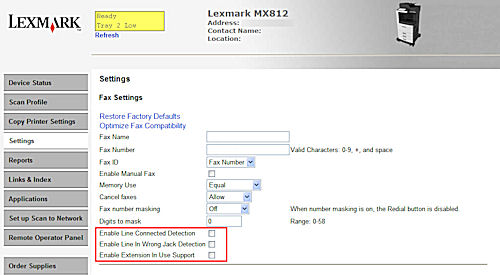 |
Make sure the options boxed in red are all unchecked. |
IMPORTANT!
Power cycle (restart) the device to reset the modem and the current line status.Still need help?
Please contact
Lexmark Technical Support
if you need additional assistance.
NOTE:
When calling for support, you will be asked for your machine/model type
and serial number
(SN
).Please call from near the printer in case the technician on the phone asks you to perform a task involving the printer.
LEGACY ID:
SO7511